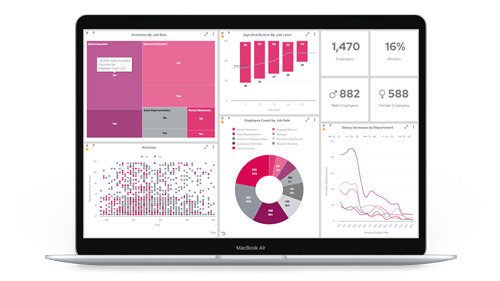




Let’s get one thing out of the way — we had dashboards. Lots of them. They looked decent. They worked… kind of.
But they weren’t telling us the things we actually needed to know.
As we added more tools — GitLab, AWS, JetBrains, Qase, Zendesk — our data sources multiplied, but our visibility didn’t. Each system had its own native reporting, but none of it gave us a consolidated view. Our teams were working in silos, and we were spending more time digging for insight than building, testing, or shipping code.
That’s when we were given the challenge:
“Drink our own champagne.”
Use Panintelligence internally to fix our own engineering reporting stack. Create something that helps us build better software — not just log more metrics.
The Problem: The Right Tools, the Wrong Insight
As engineers, we’re tool-heavy by nature — and for good reason. But all the integrations in the world don’t help if your visibility is stitched together by screenshots, exports, or blind trust.
Here’s what we were living with:
Development:
- GitLab pipelines were running, but deployment frequency, failure causes, and build durations weren’t easily trackable across repos.
- Code complexity issues were flagged in JetBrains, but the insights stayed local — not visible at the team or sprint level.
- Refactoring was happening, but we had no way to show its impact over time.
“We were measuring quality in commit messages and gut feel.”
QA & Test:
- Test cases were structured in Qase, but test coverage vs. sprint delivery wasn’t visible outside the QA team.
- Regression tests were being run, but trend data wasn’t accessible without manual effort.
“We had automation — but we still needed to explain test status every week.”
Cloud:
- AWS metrics existed in CloudWatch, but performance and cost anomalies were buried.
- Tracking resource utilisation across environments required flipping between services and tagging conventions.
“We had graphs for everything — and no actual visibility.”
Support:
- Zendesk tickets raised by customers that had engineering root causes weren’t being fed back into development cleanly.
- Recurring issues went unnoticed until someone yelled loud enough.
“We needed a better loop between customers and code.”
The Objective: Build Dashboards Engineers Actually Use
We didn’t want to “build dashboards.” We wanted to:
- Stop wasting time on reporting
- Track the metrics that matter
- Surface issues before they become blockers
- Give the whole engineering team one place to see what’s going on
So we used Panintelligence to build dashboards that integrate directly with:
- GitLab (CI/CD metrics)
- JetBrains (code quality metrics)
- Qase (test case and automation tracking)
- AWS (performance, cost, usage)
- Zendesk (support-driven engineering feedback)
What We Built
1. CI/CD Dashboard – GitLab
Tracks: Pipeline run times, failure rates, job durations, recovery time, deployment frequency
Why: Now we can spot which repos are slowing us down — and fix them.
2. Code Quality Dashboard – JetBrains
Tracks: Code smells, complexity by module, refactoring effort, review lag
Why: We’ve made technical debt visible and tied it to sprint deliverables.
3. QA & Automation Dashboard – Qase
Tracks: Pass/fail trends, automation coverage, regression results, untested features
Why: Everyone — not just QA — can now see the health of our tests.
4. Infrastructure & Cost Dashboard – AWS
Tracks: CPU/memory/disk metrics, uptime, scaling activity, cost per service/project
Why: We’ve gone from reactive monitoring to proactive cloud management.
5. Support Loop Dashboard – Zendesk
Tracks: Engineering-tagged tickets, resolution time, recurring themes, impact by release
Why: Support and engineering now speak the same language — using shared data.
The Result: More Engineering, Less Explaining
What changed?
- Stand-ups became faster and more focused
- Test planning aligned with sprint goals — automatically
- We finally know where our AWS costs are trending
- Support issues are influencing roadmap discussions, not just post-mortems
- Our DevOps review meetings run off the dashboards — no prep required
Most importantly, our teams are now spending time on building software — not explaining what happened last week.
Final Thought: Engineers Don’t Need More Tools. We Need Better Insight.
We didn’t rebuild these dashboards to tick a box. We rebuilt them because the old way was getting in the way of delivering good software.
If your development and cloud teams are context-switching across five different platforms to answer basic questions — we’ve been there.
We drank our own champagne. Now we’re building faster, testing smarter, and reacting quicker.
And if you want to do the same, we’ll gladly show you what we built.